I wrote all my journals on a microsoft word document and just kept it running throughout the year! Hopefully this works and I do not look like an idoit!
New Media 1000
Journals
Scott Mackinnon
Michael Jorgensen
January 11th/2007
Today I began my first New Media experience I had been quite excited for sometime about being able to take this class because for my first three and a half years at this university it had been restricted to only New Media majors. So finally in my last semester of university I am now able to take this class which has intrigued me since I began. We started by talking about New Media what it was, its use’s, it’s functions and how it has been directly defined. I felt this to be very useful and helpful because it gave me general ideas as well as notions as to what society perceives New Media to be and what its general uses are.
The second part of class was used to describe one of the general yet effective ways to use a very common, simple yet integral part of the New Media experience the blog. We began by starting a blog and showing how this was going to become an effective form of expression and communication within our class. We were shown how to log into blogspot.com which is an engine that runs all blogs and connects them worldwide. I was extremely impressed by the overall nature, simplicity, effectiveness and accessibility of the blogs! I was so impressed that I actually was excited to start this project. I loved the fact and ability for people to be able to add videos and take them off, add comments pictures, whatever they ultimately wanted! This could not have been a better project to get use to and get acquainted with the New Media philosophy, I could not have asked for more! And in turn this blog which was tremendously easy to start functioning had given me the right attitude towards New Media! My creative experience was underway and I could not have been happier about it!
January 16th/2007
Throughout this New Media experience so far I have begun to notice the ultimate change that computers have made on our new generation and the ultimate effect that they have on our divine world!! New Media has changed our society in so many direct ways, with things such as myspace the world is so small and touchable that friends across the world can be in contact in seconds. Businesses on the other side of the world can interact with each other and education systems, family all aspects of this world becomes so much simpler because of New Media and it’s technology. It is amazing to me the effect that New Media has on our world and I am beginning to notice how utterly different it would be without New Media and its expressions. Through this blog that we have created for class I am truly amazed how quickly someone can update it and how quickly they can change what posts, responsibilities as well as formats on the website. It truly is amazing!! All this through New Media and what New Media represents allows me to comprehend what I have wanted to for so long! This class I know I will learn stuff that is beneficial, I am going to learn stuff that will help me for the rest of my life, skills that will transfer from profession to profession. In ten years no one is going to care if I learned about culture and physical education they are going to care if I can work a computer, Photoshop! These are skills that will be relevant when I decide what I want to accomplish with my life.
January 25th/07
Today we began to learn the in’s and out’s of Photoshop! I really enjoy this program so far and completely realize how this will become beneficial for the entirety of my professional career. Whether it is using Photoshop to make birthday presents, or using it to explain to a class a school lesson. This program will and has already been more beneficial then half the courses I have taken at this university. We also learned our first assignment which seems really creative and exciting! We have to take three pictures of ourselves in many different positions and Photoshop these pictures into three futuristic settings 25 years from now, 50 years from now and 100 years from now. I have already started on this project and the creative process that this kind of project allows you to do is limitless! You can do whatever you like, whatever you feel suits you and your personality at that particular moment. I have started the picture of myself in 25 years by finding a similar looking face on photodisc.com of myself and exporting that on top of it, because of Photoshop you can export different layers you are able to diffuse and put together two different pictures and make them look similar. My 25 year project honestly looks like I have aged 25 years and that is really cool! It is ridiculous to think that someone as computer illiterate before I took this class can really create something of that nature; I am astounded and very happy with myself so far on this project.
February 1st/2007
My Photoshop project is coming along extremely well! I have got my general idea down for all three of the assignments and now all I have to do is critically look at all three. I believe that I have the general concept right and now all I must do is use these concepts in the right way, with the right direction and with the amount of tedious work that each picture individually deserves. I have put a lot of time into this project and this has helped my Photoshop skills tremendously every time I sit down on the computer I feel like my skills within Photoshop or getting more accomplished. I have become a lot more confident with the program and now have begun to branch out and try different things. I really like the freedom that we have with this project because it allows us to try Photoshop and learn indirectly from trial and error. Through this project I have learned so much more from my mistakes than I ever could have from my successes. It is a really interesting and fun process. My 50 year project is almost finished and tomorrow I will begin on the 100 year I believe I am going to struggle with this the most because I do not have the greatest imagination when it comes to science fiction stuff. I have got a concept but hope that I can elaborate on it much more. Well here goes nothing.
February 8th/2007
Our Photoshop project is due today and from the looks of it I might be only one of about half the class that has finished the project. It seemed like a lot of people were almost complete but just had to put the finishing touches on their project. I spent so much time on it, that I honestly just wanted to hand it in. If I would have looked at it any longer I know I would have found something that I would have wanted to change and something that I didn’t think was perfectly right. I just would have ended up driving myself crazy. I was tremendously happy with my final project and even more elated with the process that allowed me to get their.
February 15th/2007
We have found out today that the pictures that we created during the Photoshop project we now are going to use in Adobe Illustrator. We have been told that we are going to use these pictures to write a short story that describes an event or something that coincides with the pictures. I am not going to lie to you but when I found about this project I was not too happy at all. Just because I am absolutely terrible at writing short stories and did not really expect something like this in New Media class. I realize that this is a creative outlet but I just honestly really suck at writing and know I am going to struggle with this project. For the rest of the class I tried diligently and relentlessly to get something down on paper, anything. We have reading week coming up and I really just wanted to take a break from school and reenergize. But I knew that if I did not get anything down on paper I was going to have to come in during reading week and that was the last thing that I wanted to do! Disappointed I left the classroom knowing that my reading week would not be school free. I tried my best but just could not get down anything that I liked or felt sounded half intelligent.
February 22nd/2007
Reading Week No Classes
March 6th/2007
Today our booklet was due! I had trouble binding it with string because I could not figure out how to do the Japanese binding technique so in the end just did my own way and it worked just fine. The booklet was a tough project for me. I believe that my Photoshop pictures were very good, very well thought out and really consistently effective. My writing on the other hand I really struggled with. I hope this does not affect my mark just because I found it really hard to write about a story that was already made up through pictures. For some reason I couldn’t get my mind to apprehend the situation and couldn’t get my mind to write anything that I felt did justice to the creativeness of the picture. I just struggled with the writing part! I really enjoyed using Illustrator to divide the pictures and think that this program could be very useful I just got quite frustrated with the writing and eventually I believe I left this project short of where it should have become.
March 13th/2007
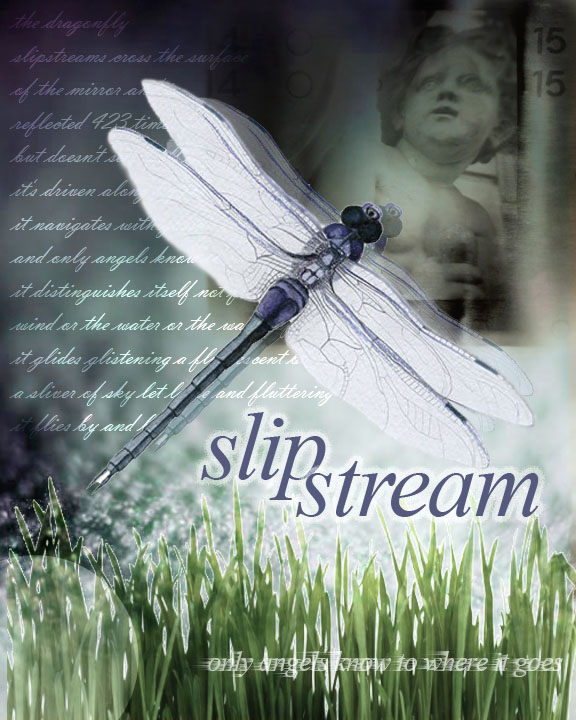
1. Research other artists' work, and choose a collage style that you'd like to work in and inspire your own work. I've chosen the work below:2. Analyze and deconstruct the elements of the collage and its style. In the work above, the artist has chosen as the central element a crow, and made it have the greatest emphasis in the piece. By selecting a powerful symbol, the artist has the opportunity to play with related or contrasting elements in the rest of the work. As well, the collage will resonate emotionally and intellectually with the viewer.Note that the text used in the background is placed on a mottled, textured background. The text itself employs key words that are related to the crow symbol: messenger, gift, prophecy, flight, life, etc. An additional theme is added with examples of ties or knots, and the words "untie me." A handwriting font has been used to suggest journaling, or a personalized message.In contrast to the crow being a harbinger of death or evil, the artist has highlighted the words "hope" and "see past." It seems that the artist wants the viewer to "see past" the negative connotations of the crow, and recontextualize it into a message of hope. Another view of the crows wings are superimposed and made partially transparent in the background, suggesting angel wings, or at the very least, flight.At the same time, the negative connotation of the crow is reinforced by using the number "13" on top of its head.A compass dial is superimposed over a part of the bird, suggesting flight, movement and direction, one of the repeated themes.There is a reinforcement of the negative themes, then a reconstruction of new themes throughout the piece. By juxtaposing these, it allows the viewer to participate in the construction of new meaning, as opposed to delivering a consistent, literal message.3. So, how do I apply this to my own work?Choose a powerful symbol that resonates with you. For example, a dragonfly is a symbol that resonates powerfully for me, and I will choose to use this in my own collage.On the internet and at the library I researched the dragonfly - in particular the fluorescent blue dragonflies I've seen in Southern Alberta this summer. It is known as Boreal Bluet. I discovered that they have the largest eyes of any insect proportionate to the rest of their body, and that there are 432 facets per eye. I learned that they spawn in water, and love to skim across the surface of water. I didn't find any information on the meaning of dragonflies as a symbol...nevertheless, I reflected on what I find fascinating and beautiful about them, and ended up writing a poem.the dragonflyslipstreams cross the surfaceof the mirror and isreflected 423 times twobut doesn't see itself becauseit's driven along by the currentit navigates with gossamer wingsand only angels know to where it goesit distinguishes itself not from thewind or the water or the waves of grassit glides glistening a fluorescent bluea sliver of sky let loose and flutteringit flies by and byIn your own work, do some research on your symbol, write a poem, or find others' poems and writings you can use in your collage.4. Choosing pictoral elementsI began with doing a search on www.photodisc.com for a background water image. This was my first attempt:But I realized it was too 'pretty.' I was looking for a more dramatic and edgier effect. So I tried another water background, with more dark areas:The effect is okay, but I realized the water image was overtaking the dragonfly image. I changed tacts, and did a search on PhotoDisc for an earth background, and found this:I liked the monochromatic colours of this background and the fact that it did not overwhelm the dragonfly which should be my main emphasis. I decided to go with this background.To decide on what other images to add, I looked through my poem, and saw the key words "angel," and "blades of grass." After doing a search on PhotoDisc, I found this cute but ugly stone angel. Again, when we think of angels, we usually think of a beautiful image - to play against that expectation, I chose an image that was stone, chubby, and roughly photographed.It seemed to fit at the top right hand side, and I used "Multiply" blending on the layer to merge it with the background. I found an image of "blades of grass" which I pasted onto the bottom, and used "Hard Light" layer blend and a Gaussian Blur of 1.0 pixel.I looked for a word that was meaningful, but not too literal within my poem, and decided upon "slipstream." I used Times New Roman, but made it italic to give it movement (like the word). I put it on two lines and put it in all lowercase to make it look more poetic. And I added an outer glow.Finally, I added my poem using a script font, and used the Overlay effect on the layer, so that the text fades in and out - it's not entirely readable - just a little. Finally, I added "only angels know to where it goes" at the bottom, then "Rasterized" the layer so that I could apply a Wind filter effect to the text. I also made the opacity of the layer 75% so it's a bit transparent. Here's the final piece:I could keep working on it, but for now, this should give you some ideas on how to construct your own collage.
When we started our collage for the website portion of our assignment I really liked this tutorial that you put on the class blog. I felt that this gave me the directions that I needed and helped me develop a home page that I truly felt was good. I was able to use this instruction and find elements for my own collage that allowed me to develop what I truly wanted to. I loved the fact that this showed me how to accomplish what I wanted to and then through this I was able to go do that. This was a great tutorial and allowed me to create something I am truly proud of!
March 22nd/2007
My website is almost complete now and I think I did a way better job on this assignment than I did on the booklet. I was happy with what I had created and felt that I had done my best work. I read your criticism from the booklet and felt that what I needed to do was recreate my homepage, recreate my identity of the work , I felt that this would help recreate and determine to the reader’s what my story was all about. The index’s all work with each other , my original photoshop pictures and I believe finally the story. I appreciate your description of how to do this and your criticism it allowed me to represent my creativeness and goals more accurately.
March 29th/2007
Began to work on my video today! Today in class we saw a bunch of examples of how these videos should look. I was really impressed with what some of the past students had accomplished with premiere pro and honestly never realized that you could do some of that stuff with this program. Some of the videos that we watched were pure genius and I was a little intimidated wondering if my partner Cory and I were going to be able to represent something like that. Some of these videos incorporated so many effects, digital trickery, aspects and eye pleasing transitions and changes that I was completely intimidated. I thought to myself and honestly wondered if I was ever going to be able to create something as dramatic, intelligent, and humorous as that. My favorite video was the one that dealt with the underground rock group the Sex Pistols I thought it was done brilliantly.
April 5th/2007
Today we did our introduction and tutorial as far as Adobe Premiere Pro 2 goes. There are so many functions and so many possibilities. I can see how people could spend hours, on hours of tedious work trying to use different effects, transitions. Your creative outlet is honestly endless and you can do pretty much anything you want with this program! Cory and I will start our project tomorrow! I think that this will be my last journal entry of the year as I have five finals coming up! I enjoyed this class tremendously and would recommend any non New Media major to take the class! It has helped me so much and I believe it will only continue to help me throughout my further schooling and profession.




Subscribe to:
Posts (Atom)